
Wake a NAS or PC — no VPN needed
Wake a device and verify that it responds, from a Telegram bot or an ntfy topic. Tailscale is optional: the ESP32 can be just a Wake-on-LAN node.
Set up Wake-on-LANMattboxx Edition
One ESP32. Remote access, Wake-on-LAN and backup internet. Enable only what you need.
Wake a NAS or PC and check that it answers from Telegram or ntfy, no VPN needed. Give devices without a VPN client access to selected Tailscale or Headscale services. Keep IoT devices online over Ethernet or a 4G/LTE SIM, wired to the pins or on USB, when Wi-Fi drops.
Firmware v3.0.29 · ESP32-S3 N8R8 / N16R8 · Buy the tested board · What's new
Wake a device and verify that it responds, from a Telegram bot or an ntfy topic. Tailscale is optional: the ESP32 can be just a Wake-on-LAN node.
Set up Wake-on-LANUse a mobile SIM or wired Ethernet as the main or backup uplink, with automatic failover and an optional monthly data limit. Connect a 4G/LTE modem or a W5500 Ethernet module to the board's pins, or plug a USB modem, 4G stick or USB Ethernet adapter into its USB port (USB in beta).
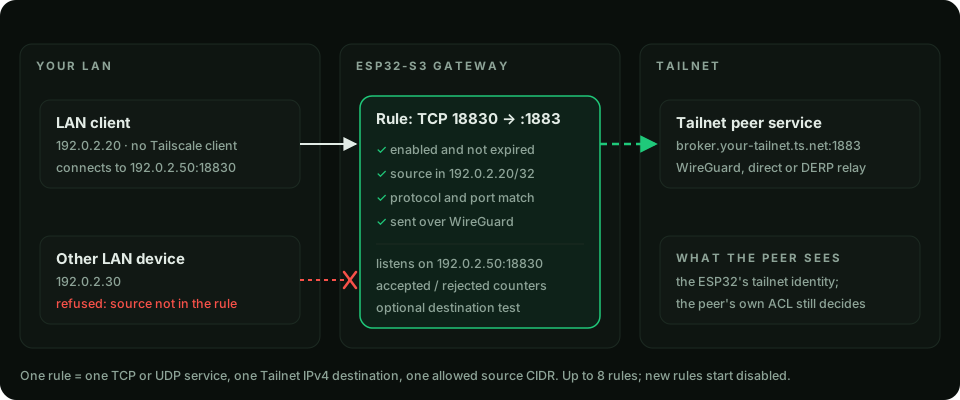
Hardware · USB devicesGive a device on your LAN access to a selected TCP or UDP service on a Tailnet peer. Restrict access by source IP or subnet.
Service GatewayAdvertise approved subnets to Tailnet clients, or give local devices a dedicated Wi-Fi network through the ESP32.
Network modesReview local event history and resource trends. Connect Home Assistant via MQTT, send alerts via Telegram, email or ntfy, or monitor over SNMP.
Automation · Event historyA controller at a second site can connect to the ESP32's LAN address and send messages to an MQTT broker on your Tailnet. The ESP32 forwards only the service covered by the rule. The controller keeps its existing network connection.
Already running the firmware? See updates and rollback. Choosing a role? Explore all firmware features · View the firmware interface.
This community firmware runs on a microcontroller. It suits control traffic, automation, dashboards and SSH. Check hardware compatibility and read the security model for the role you plan to use.