
Features
Every capability below is a switch. A user who only needs LAN → Tailnet access never has to configure recovery, MQTT, ntfy or SNMP. Disabling a feature stops its runtime work; it does not remove its code from flash.
New in Firmware 3.0
Firmware 3.0.2 makes every settings save all or nothing, also across a power cut. Firmware 3.0.1 added optional Dynamic DNS (DuckDNS, Cloudflare or a custom HTTPS update URL), French and German, translated first-boot uplink setup and smaller, cached language scripts.
| Capability | Useful when | Default |
|---|---|---|
| Event history | You want to know what happened while you were away: starts and power losses, crashes, updates, Wi-Fi and tailnet drops, failed admin logins, settings copies. Kept in the gateway's flash across restarts. | Off |
| Trends with a chart | You want to see how memory, uplink traffic, Wi-Fi signal, CPU load and online peers behave over time: 6 hours at one-minute detail, about 45 days in summary. | Off |
| Settings copies | An update or a wrong change must be reversible: up to three copies of every setting, by hand or automatically before each update; restore needs the admin password. | Off |
| Tailnet names for local devices | Devices without Tailscale on the gateway's Wi-Fi or your home LAN should reach peers by name (nas, nas.your-tailnet.ts.net). A name is not access: rules and policies still apply. | Off |
| Telegram and email notifications | You want problems or every event on your phone or in your inbox. Email over TLS (465) or STARTTLS (587) with verified certificates; passwords are never sent without TLS. | Off |
| Throughput test | You need to know whether the link is fast enough: the gateway downloads from a URL (a NAS through the tailnet, or the internet), or the browser downloads from the gateway. | On request |
| Cellular uplink (experimental) | A site has no usable Wi-Fi: a UART modem with a SIM as primary or failover uplink. Not yet tested with a real modem. | Off |
| One image, every language | English, Italiano, Español, 简体中文, Français and Deutsch in the same firmware, plus the W5500 Ethernet driver (experimental, off until configured). | — |
Disabled optional features do not run their background jobs; their compiled code and static state still occupy space. Runs on ESP32-S3 N8R8 and N16R8: see supported boards.
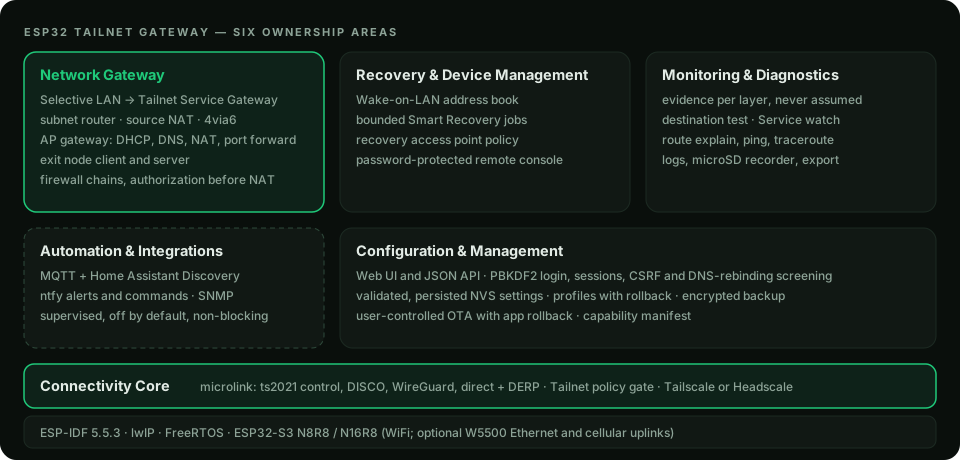
Network gateway
| Capability | What it does | Default |
|---|---|---|
| Selective Service Gateway | Up to 8 TCP/UDP rules from a LAN listen port to one Tailnet IPv4 destination (literal or MagicDNS name), each with a mandatory source CIDR, binding token and optional expiry. | Rules start disabled |
| Subnet router | Advertise the uplink LAN and/or the AP subnet to the tailnet; optional source NAT; optional 4via6 for overlapping IPv4 sites. | Off |
| AP gateway | Own WiFi access point with DHCP reservations, MAC denylist, cached DNS forwarder, NAT and AP-side port forwarding. | Recovery-only AP |
| Exit node | Send AP traffic through a Tailnet exit node (fails closed), or advertise the ESP32 itself as an IPv4 exit node. | Off |
| Firewall | Four first-match chains with hit counters; Tailnet authorization on original packets before NAT. | Allow when empty |
Recovery and device management
- Wake-on-LAN address book (up to 12 devices) from the Web UI, MQTT, Home Assistant or replay-protected ntfy commands.
- Bounded Smart Recovery jobs: precheck a known port, one WoL burst, wait, check again.
- Recovery access point that returns 60 seconds after the saved WiFi disappears and stays until it is back.
Monitoring and diagnostics
- Per-rule state, accepted/rejected counters, admitted replies and the last evidence seen.
- Destination test (one bounded TCP handshake) and opt-in Service watch with change alerts.
- Route explain, ping, traceroute, WiFi scan, live logs, optional microSD flight recorder, sanitized diagnostic export.
Configuration and management
- Responsive Web UI and JSON API; PBKDF2 password verifier with login challenge, sessions, cross-site and DNS-rebinding screening.
- Configuration profiles (Gateway, Recovery, IoT, Monitoring, Advanced) with preview and rollback.
- Encrypted configuration backup and restore; opt-in GitHub updates with application rollback.
- No telemetry, crash uploads or forced update polling.
Automation and integrations
MQTT with Home Assistant Discovery, ntfy alerts and commands, Telegram and email (SMTP) notifications, read-only SNMP v1/v2c. Each is supervised and off by default; none can block routing or local administration. See Automation.