
Remote recovery
Who it is for: homelab owners whose NAS or PC is sometimes off or asleep when they are away, and whose own Tailscale client is then unreachable.
Requirements
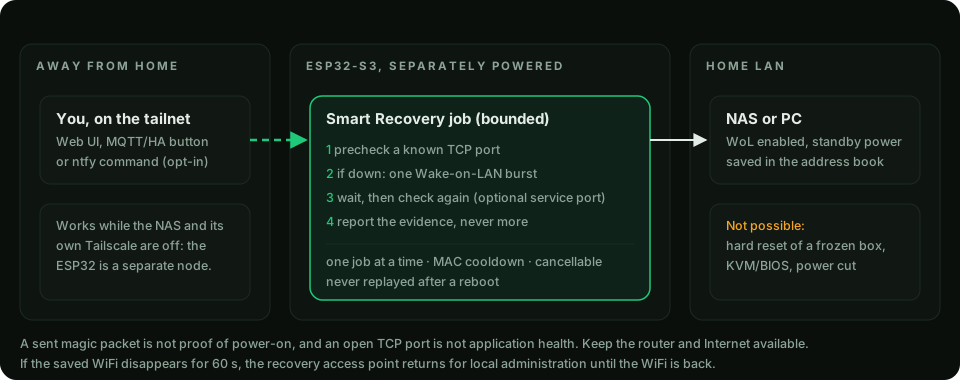
If Tailscale runs only on your NAS, shutting the NAS down also removes that access point. The ESP32 runs as a separate Tailnet node: open its Web UI remotely and send Wake-on-LAN without keeping another Linux server or Home Assistant running. See the actual firmware interface.
- A target that supports Wake-on-LAN, with WoL enabled in its firmware/OS and standby power.
- The ESP32 powered independently of the target, on the same LAN broadcast domain.
- A known TCP port on the target to check (SSH may be disabled on some NAS systems; pick a port that is really listening).
Procedure
- Add the device in Automation → Wake-on-LAN (name and MAC address).
- Open Devices & Recovery, choose the target, check port, optional service port and timeout.
- Use Check now to observe, or Recover with WoL to precheck, wake if needed, wait and check again.
Verify
The result lists each step's evidence: precheck, whether a magic packet was sent, and the post-wake check. A sent packet is not proof of power-on; an open TCP port is not application health.
Recovery access point
If the saved WiFi is not seen for 60 seconds, the ESP32 brings its access point back for local administration and keeps it until the WiFi returns. Short reconnect retries do not postpone this timer.
Limits
- Cannot hard-reset a frozen machine, cut power, or provide KVM/BIOS access. Not out-of-band management.
- Needs the router, Internet and tailnet infrastructure to be up for remote use.
- One job at a time, MAC cooldown, cancellable; jobs never replay after a reboot.
Security
Remote recovery commands over MQTT or ntfy are off by default and need an extra permission. Use private topics, TLS and broker ACLs. Guides: Smart Recovery, NAS recovery checklist.