
Connect an MQTT device in another home to your broker
Your MQTT broker is at home. A sensor or controller is on a different home's WiFi, cannot install Tailscale, but lets you change its broker address and port. An ESP32-S3 on that second LAN can provide a selective connection to the broker over your tailnet.
What goes where?
- Home A: an MQTT broker on a Tailscale/Headscale peer, or a deliberately configured reachable Tailnet service.
- Home B: your MQTT device and an ESP32 Tailnet Gateway on the same LAN.
- On the ESP32: one TCP forwarding rule, restricted to the MQTT device's source address.
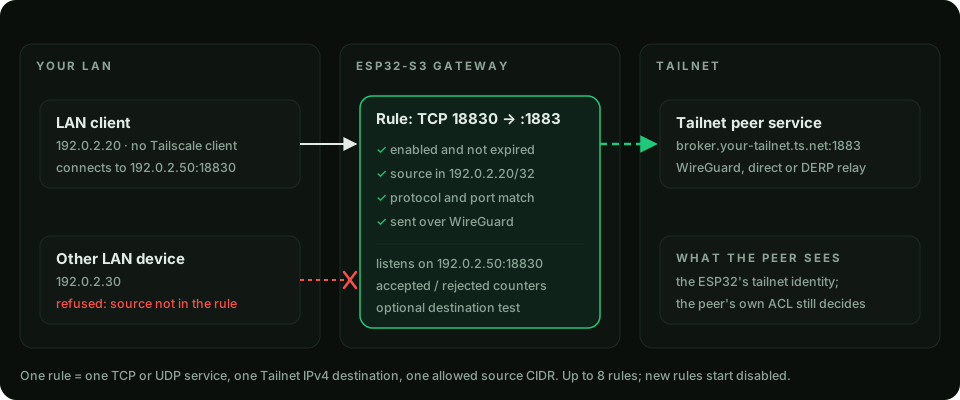
Configure the connection
- Install the firmware, complete first boot, and join the ESP32 to the same tailnet as the broker.
- Reserve the ESP32 and MQTT device LAN addresses in the router so the rule remains predictable.
- In the LAN → Tailnet Service Gateway, create a TCP rule: listen port
18830, destination your broker's Tailnet IP or MagicDNS name, destination port1883, allowed source the MQTT device's address with/32. - Test the destination, then enable the rule. The broker's Tailnet access policy must allow the ESP32 identity.
- On the MQTT device, set the broker host to the ESP32's LAN address and the port to
18830. Keep broker credentials and topic permissions configured on the broker. - Publish a test message and check the broker receives it. A local installed-rule indicator alone does not prove the MQTT application works.
What this does — and does not — replace
The MQTT connection is bidirectional once established: subscriptions can receive commands back over that connection. This does not merge the two LANs, relay multicast discovery, or make every device automatically visible to Home Assistant. Home Assistant still needs the appropriate MQTT integration, topics and device configuration.
The ESP32's own MQTT/Home Assistant Discovery integration is separate. You do not have to enable it to forward the device's broker connection.
Security and practical limits
The LAN leg between the device and ESP32 is not encrypted merely because the remote leg uses Tailscale. Use MQTT TLS where the device supports it; when connecting through an alternate LAN hostname, certificate-name validation must still succeed. Do not turn certificate verification off to make this example work.
The remote peer sees the gateway's Tailnet identity, not a separately authenticated identity for each LAN device. Use narrow source rules, broker authentication and per-device topic permissions. This suits telemetry and control traffic, not cameras or bulk transfers.
If the device can run an official Tailscale client, that may be simpler. For broad LAN access, compare subnet routing and the IoT AP gateway before choosing port forwarding.