
Network modes
Three traffic paths are independent of each other and of the Service Gateway. Enable the ones you need.
Subnet router: Tailnet → LAN
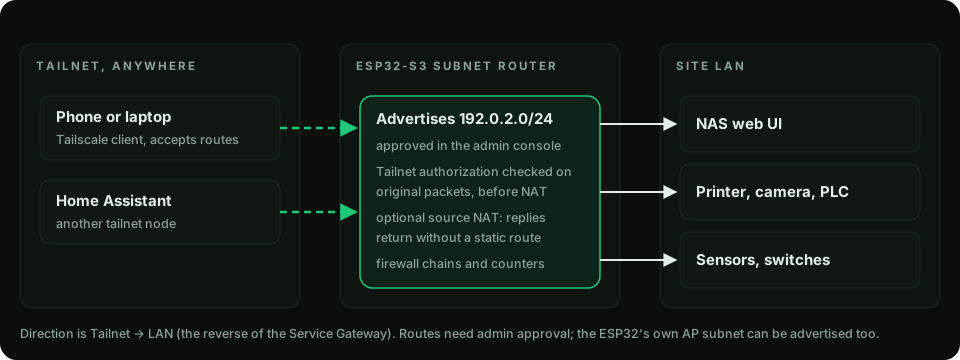
Advertise the uplink LAN and/or the ESP32's AP subnet. Turn on source NAT when LAN hosts have no route back to the tailnet. 4via6 maps an overlapping IPv4 LAN into a site-specific IPv6 prefix. Guide: Subnet router.
AP gateway for IoT
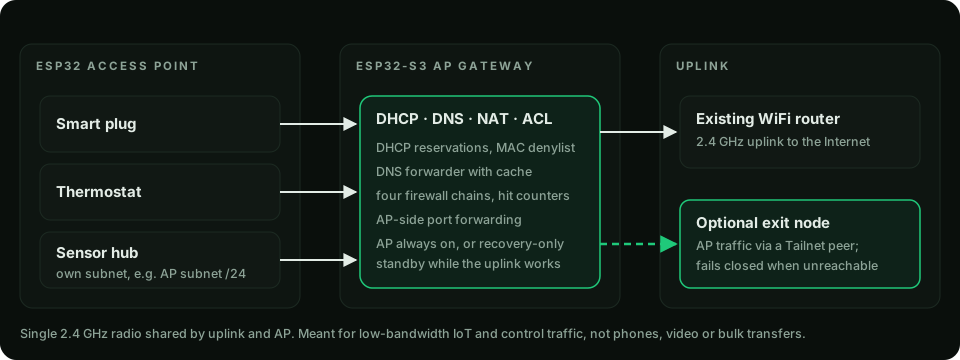
The AP can stay always on, or run recovery-only: in standby while the uplink works and back after an outage. Firewall chains and AP-side port forwarding apply to its subnet.
Exit node
As a client, the ESP32 sends AP traffic through a chosen Tailnet exit node and fails closed when it is unreachable. As a server, it advertises itself as an IPv4 exit node (approval required); IPv6 fails closed. The two modes cannot be active together. Guide: Exit node.
Which one do I need?
| Goal | Use |
|---|---|
| A LAN device must reach one remote service | Service Gateway |
| Reach LAN devices from anywhere on the tailnet | Subnet router |
| Isolate IoT gear on its own WiFi | AP gateway |
| Egress AP traffic from another site | Exit node client |
Ethernet
The standard image includes an optional W5500 SPI Ethernet uplink, off until configured, with explicit pins, DHCP or static IPv4 and WiFi-first or Ethernet-first selection. It is host-tested but not hardware-validated; see Hardware.